

How to Process Big Data with PySpark: Beginner-to-Advanced Tutorial
Quick Answer
PySpark is a Python API for Apache Spark that enables distributed processing of large datasets across multiple machines. Beginners can start with SparkSession, DataFrames, transformations, and actions, then progress to joins, aggregations, partitioning, caching, and optimization. PySpark is widely useful in Azure data engineering workflows, particularly with Azure Databricks, Azure Data Factory, and cloud-based data pipelines.
Big data has changed how modern organizations collect, store, analyze, and use information. From customer transactions and application logs to IoT devices and business analytics, companies can generate millions or even billions of records every day.
The challenge is not simply storing this information. The real challenge is processing it quickly and efficiently.
This is where Apache Spark and PySpark become important.
PySpark allows developers and data engineers to use Python for distributed data processing with Apache Spark. Instead of processing a massive dataset on a single machine, Spark can distribute the workload across multiple machines and process data in parallel.
For professionals preparing for an Azure Data Engineer career, learning PySpark is particularly valuable because Spark-based technologies are an important part of modern cloud data platforms, including Azure Databricks.
In this tutorial, we'll move from PySpark fundamentals to advanced concepts and explain how these skills connect with Azure data engineering.
What Is PySpark?
PySpark is the Python interface for Apache Spark, an open-source distributed computing framework designed to process large-scale datasets.
Traditional Python programs often process data on a single machine. This can become inefficient when datasets are too large for available memory or when processing requires significant computational power.
Spark addresses this challenge through distributed computing.
A Spark application can divide a large workload into smaller tasks and execute those tasks across a cluster of computers.
PySpark provides Python developers with access to Spark's capabilities while allowing them to work with familiar Python syntax.
A typical PySpark workflow looks like this:
Data Source → PySpark Processing → Transformation → Analysis → Output
Data may come from databases, CSV files, APIs, cloud storage, data lakes, or enterprise applications.
Why Is PySpark Important for Data Engineers?
Data engineers are responsible for building systems that collect, transform, process, and deliver data for analytics and applications.
PySpark is useful when data volumes become too large or processing requirements become too complex for traditional single-machine tools.
Common PySpark use cases include:
- Large-scale ETL processing
- Data cleaning
- Data transformation
- Log processing
- Data lake processing
- Batch analytics
- Machine learning preparation
- Data pipeline development
- Cloud data engineering
This is why PySpark is a valuable skill for professionals pursuing a Microsoft Azure Course in Pune or a specialized Azure Data Engineer Course in Pune.
PySpark Environment Setup
Before processing data, you need a Python environment and a Spark installation.
For learning purposes, you can work with:
- Python
- PySpark
- Jupyter Notebook
- Google Colab
- Databricks
For enterprise projects, PySpark is frequently used within managed cloud environments such as Azure Databricks.
If you are following an Azure Data Engineer learning path, practicing PySpark locally and then implementing similar workloads in Azure Databricks can help connect programming concepts with enterprise data engineering.
Creating Your First SparkSession
The SparkSession is the entry point for working with PySpark.
A simple example is:
from pyspark.sql import SparkSession spark = SparkSession.builder \ .appName("BigDataTutorial") \ .getOrCreate()
Once the SparkSession is created, you can begin loading and processing data.
Think of SparkSession as the starting point through which your PySpark application communicates with the Spark processing environment.
Reading Data with PySpark
One of the first tasks in any data engineering workflow is loading data.
For example, you can read a CSV file:
df = spark.read.csv( "sales.csv", header=True, inferSchema=True ) df.show()
Here:
header=Truetreats the first row as column names.inferSchema=Trueattempts to identify appropriate data types.show()displays sample records.
In a real Azure environment, the source could instead be cloud storage or a data lake.
This makes PySpark especially relevant to Azure ETL Training in Pune because the same transformation concepts can be applied to enterprise cloud pipelines.
Understanding PySpark DataFrames
The DataFrame is one of the most important concepts in PySpark.
A DataFrame represents structured data organized into rows and columns.
For example:
Customer
City
Sales
A
Pune
5000
B
Mumbai
7200
C
Pune
4300
You can inspect a DataFrame using:
df.show() df.printSchema() df.columns
Understanding DataFrames is essential before moving into advanced PySpark development.
Transformations in PySpark
Transformations describe how you want to change your data.
Examples include:
select()filter()withColumn()drop()groupBy()join()
For example:
filtered_df = df.filter(df.Sales > 5000) filtered_df.show()
The important concept here is that Spark transformations are generally evaluated lazily.
Spark creates a logical execution plan and waits until an action requires the result.
Actions in PySpark
Actions trigger actual computation.
Common actions include:
df.show() df.count() df.collect() df.first()
For example:
total_records = df.count() print(total_records)
Understanding the difference between transformations and actions is fundamental for writing efficient PySpark applications.
Filtering and Selecting Data
Suppose you want only customer and sales information:
result = df.select("Customer", "Sales") result.show()
You can also filter records:
result = df.filter(df.Sales > 5000) result.show()
Multiple conditions can be combined when building practical data pipelines.
These basic operations form the foundation for more advanced ETL workflows.
Using PySpark for Data Cleaning
Real-world data is rarely perfect.
Datasets may contain:
- Missing values
- Duplicate records
- Incorrect data types
- Invalid values
- Inconsistent formats
PySpark provides functions for handling these situations.
For example:
df = df.dropDuplicates()
Missing records can be handled with:
df = df.dropna()
Or values can be replaced using:
df = df.fillna(0)
Data cleaning is a critical part of Azure ETL Training in Pune because enterprise pipelines must prepare data before it reaches analytics platforms.
Creating New Columns
You can create calculated columns with withColumn().
For example:
from pyspark.sql.functions import col df = df.withColumn( "Tax", col("Sales") * 0.18 ) df.show()
This becomes useful when creating business calculations during ETL processing.
Grouping and Aggregating Data
Business users frequently need summarized information.
For example, you may want total sales by city:
from pyspark.sql.functions import sum city_sales = df.groupBy("City") \ .agg(sum("Sales").alias("TotalSales")) city_sales.show()
This transforms detailed transaction data into business-level insights.
Aggregation is one of the most common operations in data engineering and analytics workloads.
Joining DataFrames
Data engineers often work with multiple datasets.
For example, you might have:
- Customer data
- Order data
- Product data
These datasets can be joined:
result = orders.join( customers, orders.CustomerID == customers.CustomerID, "inner" ) result.show()
Understanding joins is essential because enterprise data rarely exists in a single table.
Working with Large Datasets
Processing a small CSV file is easy.
Processing several terabytes of data requires a different approach.
Spark distributes data across partitions. Each partition can be processed independently, allowing multiple tasks to execute in parallel.
This distributed architecture is one of the major reasons PySpark is useful for big data.
For professionals undertaking Azure Databricks Training in Pune, understanding partitions is particularly important because Databricks provides a managed environment for Spark-based data processing.
Understanding Partitions
A partition is a logical chunk of data processed by Spark.
The number and size of partitions can influence performance.
You can inspect or modify partitions using operations such as:
df.rdd.getNumPartitions()
You can also repartition data:
df = df.repartition(10)
However, increasing the number of partitions does not automatically make a workload faster.
Good data engineering requires choosing an appropriate partition strategy based on data size, workload, cluster resources, and downstream requirements.
Caching and Persistence
Sometimes the same DataFrame is used multiple times.
Repeatedly calculating it can increase processing time.
Caching can help:
df.cache()
You can then reuse the DataFrame across multiple operations.
However, caching should be used thoughtfully because cached data consumes cluster memory.
PySpark Performance Optimization
As datasets grow, optimization becomes increasingly important.
Some important techniques include:
- Avoid unnecessary transformations
- Select only required columns
- Filter data early
- Use appropriate partitioning
- Avoid unnecessary
collect() - Cache only reusable datasets
- Optimize joins
- Use appropriate file formats
- Monitor Spark execution plans
For example, instead of loading every column:
df = spark.read.parquet("sales/")
you can select only what you need:
df.select("CustomerID", "Sales", "City")
Reducing unnecessary data movement can improve processing efficiency.
Why Parquet Matters in Big Data
CSV files are easy to understand, but columnar formats such as Parquet are widely used in modern data platforms.
Parquet provides efficient storage and supports column-based reading.
For example:
df.write.mode("overwrite").parquet("output/sales")
You can later read it using:
df = spark.read.parquet("output/sales")
Understanding efficient storage formats is an important part of advanced data engineering.
PySpark and Azure Databricks
Azure Databricks combines Apache Spark capabilities with the Microsoft Azure cloud ecosystem.
A typical architecture may look like:
Source Systems → Azure Data Factory → Azure Data Lake → Azure Databricks/PySpark → Curated Data → Power BI
In this architecture, Azure Data Factory can orchestrate data movement and workflows, while PySpark running in Azure Databricks can perform large-scale transformations.
This relationship explains why Azure Data Factory Training in Pune and Azure Databricks Training in Pune can complement PySpark skills.
PySpark with Azure Data Factory
Azure Data Factory is commonly used for data integration and pipeline orchestration.
A data pipeline could:
- Extract data from a source system.
- Store it in Azure Data Lake.
- Trigger a Databricks workload.
- Execute PySpark transformations.
- Store processed data.
- Make the data available for analytics.
Learning both technologies provides a broader understanding of cloud-based data engineering rather than treating ETL as an isolated programming task.
This combination is particularly relevant for learners exploring an Azure Data Engineer Course in Pune.
Building a Practical PySpark ETL Pipeline
Imagine an e-commerce company receiving daily order data.
The raw data contains:
- Order ID
- Customer ID
- Product ID
- Quantity
- Price
- Order Date
A PySpark pipeline could:
Step 1: Read raw data.
Step 2: Remove duplicate orders.
Step 3: Handle missing values.
Step 4: Calculate total order value.
Step 5: Join customer information.
Step 6: Aggregate sales by region.
Step 7: Save the processed dataset as Parquet.
Step 8: Make the data available for reporting.
This is closer to the type of workflow data engineers encounter in real projects.
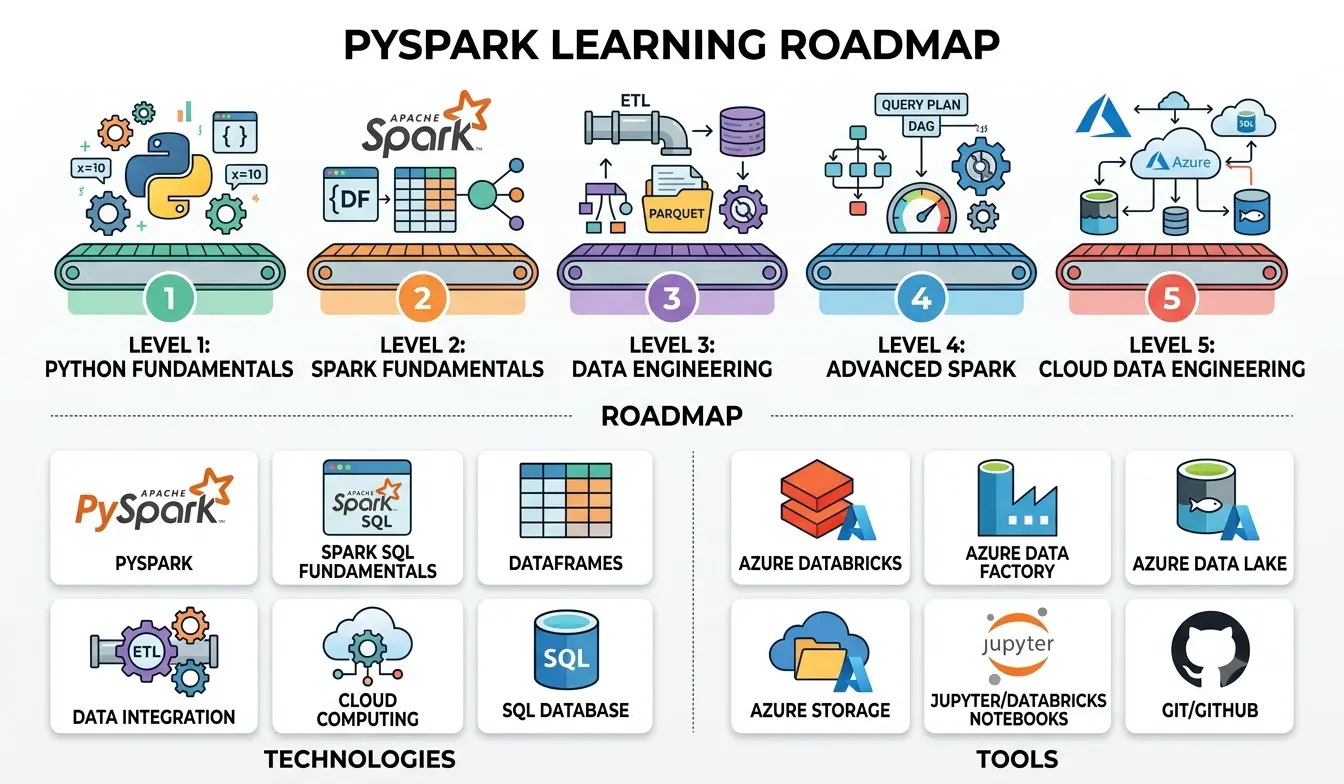
Beginner-to-Advanced PySpark Learning Roadmap
If you're starting PySpark, avoid trying to learn everything at once.
Follow a progressive roadmap.
Level 1: Python Fundamentals
Learn:
- Variables
- Functions
- Lists
- Dictionaries
- Loops
- Modules
- Exception handling
Level 2: Spark Fundamentals
Learn:
- SparkSession
- DataFrames
- Schemas
- Transformations
- Actions
- Lazy evaluation
Level 3: Data Engineering
Learn:
- Joins
- Aggregations
- Window functions
- Data cleaning
- ETL pipelines
- Parquet
- Partitioning
Level 4: Advanced Spark
Learn:
- Performance optimization
- Caching
- Broadcast joins
- Shuffle management
- Query plans
- Resource optimization
Level 5: Cloud Data Engineering
Apply PySpark with:
- Azure Databricks
- Azure Data Factory
- Azure Data Lake
- Azure storage
- Cloud-based ETL workflows
This progression can provide a strong foundation for professionals considering a Best Azure Data Engineering Course in Pune.
How PySpark Fits into an Azure Data Engineer Career
Learning PySpark alone does not make someone a complete data engineer.
A professional Azure data engineer should understand the broader ecosystem.
Important skills include:
- SQL
- Python
- PySpark
- Data warehousing
- ETL/ELT
- Azure Data Factory
- Azure Data Lake
- Azure Databricks
- Data modelling
- Cloud fundamentals
- Monitoring and optimization
This is why an effective Microsoft Azure Data Engineering Course should connect programming skills with architecture, pipelines, cloud services, and real-world projects.
Should Working Professionals Learn PySpark?
For working professionals moving toward data engineering, PySpark can be a valuable addition to an existing technical skill set.
The most effective approach is project-based learning.
Instead of only memorizing Spark functions, build projects such as:
- Retail sales pipeline
- Customer analytics platform
- Log processing system
- Banking transaction pipeline
- Healthcare data processing workflow
- E-commerce recommendation dataset
Projects help learners demonstrate how they apply technology to business problems.
Professionals exploring Azure Training in Pune can also use these projects to connect PySpark concepts with Azure-based workflows.
Why Azure Skills and PySpark Work Well Together
Cloud data engineering increasingly requires professionals to understand both processing technologies and cloud platforms.
PySpark addresses large-scale data processing.
Azure provides cloud infrastructure and managed services.
Azure Databricks provides a Spark-based environment.
Azure Data Factory helps orchestrate pipelines.
Together, these technologies can form a practical data engineering ecosystem.
For learners comparing different learning paths, an Azure Certification Course in Pune can provide structured preparation, while hands-on PySpark and cloud projects help develop practical capability.
Career Preparation Beyond Certification
A certification can demonstrate knowledge of a technology or platform, but practical skills matter when solving workplace problems.
A strong learning journey should include:
- Hands-on coding
- Realistic datasets
- End-to-end projects
- Cloud implementation
- Debugging
- Performance optimization
- Interview preparation
- Project explanation
At IntelliBI Innovations Technologies, the focus is on connecting technology learning with practical career preparation.
For professionals researching the Best Azure Data Engineering Course in Pune, look beyond the course title. Examine the curriculum, project depth, technologies covered, trainer experience, learning format, and career support.
Conclusion
PySpark provides a powerful way to process and transform large datasets using Python and Apache Spark. Beginners can start with SparkSession, DataFrames, transformations, and actions before progressing to joins, aggregations, partitions, optimization, and distributed processing.
The next step is connecting these skills with cloud technologies.
Azure Databricks can provide a scalable environment for PySpark workloads, while Azure Data Factory can help orchestrate data movement and workflows. Together with Azure Data Lake, SQL, Python, and data engineering principles, these technologies form a practical foundation for modern cloud data engineering.
If your career goal is to become an Azure Data Engineer, don't stop at learning individual tools. Build end-to-end projects that demonstrate how data moves from source to storage, transformation, and business consumption.
For professionals looking for Azure Data Engineer Course in Pune, Azure Training in Pune, Azure Data Factory Training in Pune, Azure Databricks Training in Pune, or Azure ETL Training in Pune, IntelliBI Innovations Technologies focuses on practical, industry-oriented learning designed to help learners build relevant technology skills.
The goal isn't simply to learn PySpark.
The goal is to understand how PySpark solves real data engineering problems.