
How to Create an AI Agent Using LangGraph: Practical Tutorial for Beginners
Quick Answer
To create an AI agent using LangGraph, define the agent’s state, connect an AI model, create tools the model can use, build nodes for each task, add conditional edges for decision-making, and compile the graph. LangGraph provides a structured way to build stateful agent workflows where an AI model can reason, call tools, receive results, and continue until the task is complete.
Artificial Intelligence is moving beyond simple chatbots and question-answering systems. Modern AI applications can understand a task, decide what action to take, use external tools, evaluate results, and continue working until the objective is completed.
This shift has created growing interest in AI agents.
For anyone exploring an Artificial Intelligence Course in Pune or planning to become an AI Engineer, understanding how AI agents work is becoming an important technical skill. Frameworks such as LangGraph make it easier to design structured workflows where an AI model can interact with tools and follow defined processes.
In this beginner-friendly guide, we will understand what LangGraph is, how AI agents work, and how to build a simple AI agent using Python.
What Is an AI Agent?
An AI agent is a software system that uses an AI model to perform tasks based on instructions and available tools.
A traditional chatbot generally follows a simple pattern:
User → AI model → Response
An AI agent can follow a more flexible workflow:
User → AI model → Decide → Use Tool → Receive Result → Decide Again → Response
For example, imagine asking an AI system:
“Find the latest sales data, calculate the growth rate, and explain the result.”
An agent could potentially:
- Understand the request.
- Decide that it needs sales data.
- Call a database or API.
- Process the information.
- Calculate the required metric.
- Interpret the result.
- Provide an answer.
This ability to combine reasoning with actions is what makes agent-based systems powerful.
For learners taking AI Classes in Pune for Working Professionals, AI agents provide an excellent practical example of how LLMs can be connected to real business workflows.
What Is LangGraph?
LangGraph is a framework from the LangChain ecosystem for building agentic applications using graph-based workflows.
Instead of treating an AI application as one large prompt, LangGraph allows developers to represent the workflow through components such as state, nodes, and edges.
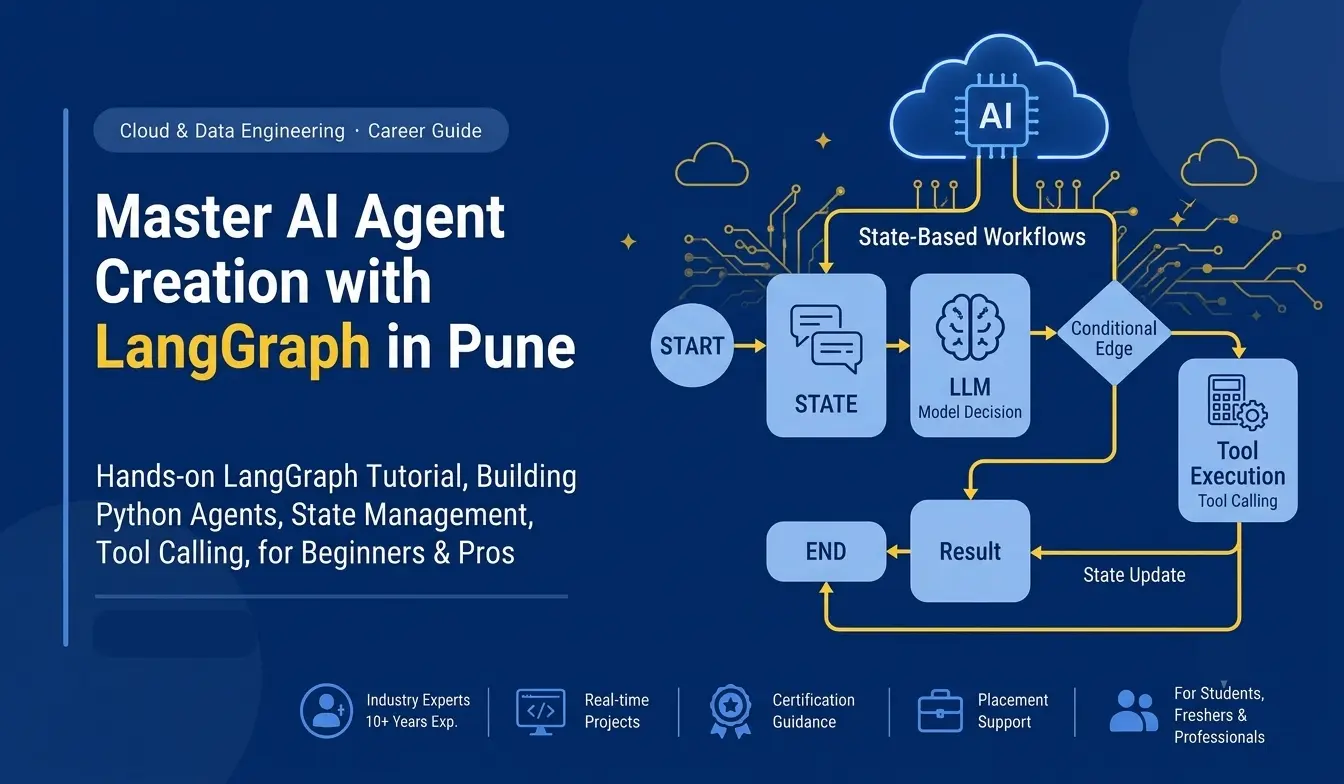
The official LangGraph quickstart demonstrates an agent workflow where an LLM can decide whether to call a tool, execute that tool, receive the result, and continue or finish depending on the outcome.
Think of a graph as a flowchart.
For example:
START → AI Model → Tool → AI Model → END
The AI model is responsible for deciding what should happen next, while the graph controls how different steps connect.
This approach is especially useful when building more complex AI applications.
Why Learn LangGraph in an AI and Machine Learning Course in Pune?
Learning Python and Machine Learning provides a strong technical foundation, but modern AI development increasingly involves LLMs, tools, workflows, and autonomous systems.
An AI and Machine Learning Course in Pune that introduces learners to modern AI development can help bridge the gap between traditional machine learning and emerging agentic AI applications.
LangGraph is particularly useful for understanding concepts such as:
- Agent workflows
- State management
- Tool calling
- Conditional routing
- LLM orchestration
- Multi-step reasoning
- Human-in-the-loop workflows
- Agent automation
These concepts are valuable for learners preparing for AI engineering roles.
Prerequisites Before Building Your First AI Agent
You do not need to be an advanced programmer to understand this tutorial.
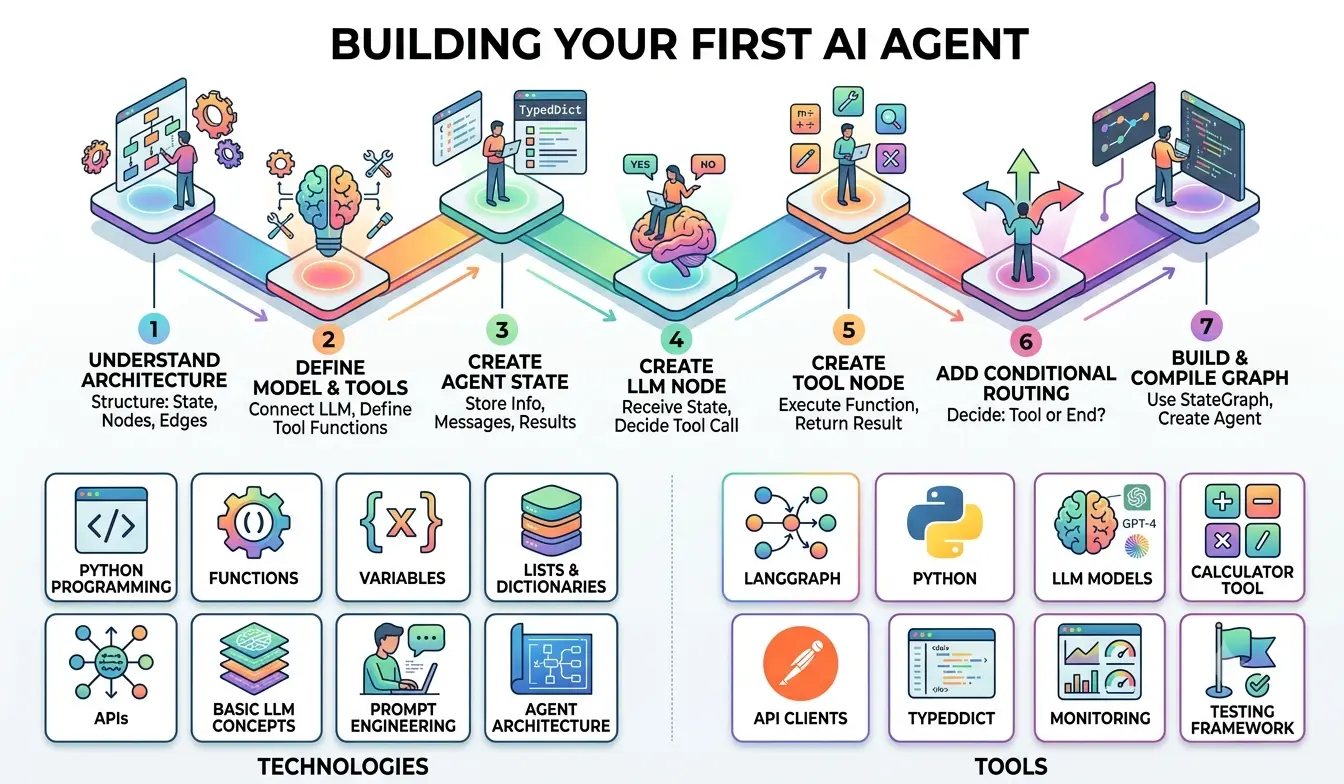
However, basic knowledge of the following will help:
- Python
- Functions
- Variables
- Lists and dictionaries
- APIs
- Basic LLM concepts
- Prompt engineering
If you are completely new to AI, an Artificial Intelligence Training in Pune program can provide a structured path from Python fundamentals to Machine Learning, Generative AI, and AI application development.
Step 1: Understand the Architecture
Before writing code, understand the architecture.
Our beginner agent can contain three major components:
1. State
State stores information about what is happening inside the workflow.
2. Nodes
Nodes perform specific operations, such as calling an LLM or executing a tool.
3. Edges
Edges determine how the workflow moves from one node to another.
A simplified workflow looks like this:
START → LLM Node → Tool Node → LLM Node → END
The important concept is that the LLM does not necessarily have to answer immediately. It can decide whether an available tool should be used first.
Step 2: Define the AI Model and Tools
The first practical step is connecting an LLM and defining tools.
A tool is simply a function that the AI agent can invoke when it needs to perform an action.
For example, you could create tools for:
- Calculating numbers
- Searching information
- Reading a database
- Checking inventory
- Sending notifications
- Calling an API
The LangGraph official quickstart demonstrates this pattern using calculator tools such as addition, multiplication, and division.
Conceptually, a Python tool can look like:
def add(a, b): return a + b
The function itself is simple.
The interesting part is allowing the AI model to decide when the function should be used.
That is where agentic workflows become powerful.
Step 3: Create the Agent State
The next step is defining what information your agent needs to remember during execution.
LangGraph uses state to store information throughout an agent's execution. The official example uses a message list and tracks the number of LLM calls.
A simplified example is:
from typing_extensions import TypedDict class AgentState(TypedDict): messages: list
The state can later become more sophisticated.
For example:
class AgentState(TypedDict): messages: list user_request: str tool_result: str
The exact state structure depends on the application you are building.
For beginners, the important concept is simple:
State is the information your agent carries through the workflow.
Step 4: Create the LLM Node
The LLM node is responsible for communicating with the AI model.
The model receives the current state and determines what should happen next.
For example, the user might ask:
“Calculate 250 × 4.”
The LLM can identify that a calculator tool is appropriate.
The node then produces a tool call rather than immediately generating a final answer.
The LangGraph quickstart follows this pattern: the model node decides whether a tool should be called, while a separate tool node executes the requested tool.
This separation makes the workflow easier to understand and maintain.
Step 5: Create the Tool Node
The tool node executes the tool selected by the model.
For example:
def tool_node(state): result = add(10, 20) return {"tool_result": result}
In a real application, the tool node would process the tool call generated by the LLM rather than always executing the same function.
The result is then returned to the agent.
The workflow becomes:
User Request → LLM → Tool → Tool Result → LLM
This loop is one of the fundamental patterns behind tool-using AI agents.
Step 6: Add Conditional Routing
This is where LangGraph becomes particularly interesting.
The workflow needs to know:
Should the agent continue or stop?
A conditional function can inspect the latest model output.
If the model requested a tool:
LLM → Tool
If no tool is required:
LLM → END
The official LangGraph example uses conditional edges to route the workflow to a tool node when the model makes a tool call and otherwise terminate the workflow.
Conceptually:
def should_continue(state): if tool_required: return "tool" return "end"
This simple decision creates a dynamic workflow instead of a fixed sequence.
Step 7: Build and Compile the Graph
Now connect your nodes.
LangGraph's Graph API uses StateGraph to define the workflow, add nodes, connect edges, and compile the final agent.
A simplified structure looks like:
from langgraph.graph import StateGraph, START, END builder = StateGraph(AgentState) builder.add_node("llm", llm_node) builder.add_node("tool", tool_node) builder.add_edge(START, "llm") builder.add_conditional_edges( "llm", should_continue ) builder.add_edge("tool", "llm") agent = builder.compile()
The exact implementation will depend on your model provider, tools, and LangGraph version.
The key idea is the workflow:
Start → Think → Act → Observe → Think → Finish
Step 8: Test Your AI Agent
Testing is essential.
Do not assume your agent works correctly just because the code runs.
Try different questions.
For example:
- “Add 25 and 35.”
- “Multiply 15 by 8.”
- “What is 100 divided by 4?”
- “Tell me something that does not require a calculator.”
Observe how the agent behaves.
Does it select the correct tool?
Does it return the tool result correctly?
Does it stop when the task is complete?
Does it continue unnecessarily?
Testing helps identify problems in prompts, tool definitions, state handling, and routing.
Common Beginner Mistakes When Building AI Agents
If you are taking Artificial Intelligence Classes in Pune, understanding common mistakes can save significant development time.
1. Starting Without Understanding the Workflow
Many beginners immediately start writing code.
First understand:
Input → State → Model → Tool → Result → Decision → Output
Then implement it.
2. Giving the Agent Too Many Tools
Adding dozens of tools does not automatically make an agent better.
Start with one or two clearly defined tools.
3. Poor Tool Descriptions
The AI model needs to understand what each tool does.
Give every tool a clear name, description, parameters, and expected output.
4. Ignoring State
Complex agents need to remember information during execution.
If state is poorly designed, the workflow can become difficult to debug.
5. Not Testing Failure Cases
What happens if the API fails?
What happens if a tool returns invalid information?
What happens if the user provides incomplete instructions?
Production-ready agents need clear error handling and safeguards.
How LangGraph Skills Support an AI Engineer Career
Learning LangGraph is not simply about learning another framework.
It teaches an important way of thinking about AI applications.
An AI Engineer may need to understand:
- LLMs
- Python
- APIs
- Prompt engineering
- Tool calling
- Retrieval systems
- Agent workflows
- Cloud platforms
- Data processing
- Application deployment
This is why an AI Engineer Course in Pune can be more valuable when it combines theoretical AI concepts with hands-on application development.
A practical Artificial Intelligence Certification Course in Pune should ideally help learners move beyond definitions and build working projects.
Who Should Learn LangGraph?
LangGraph can be useful for:
- Python developers
- AI enthusiasts
- Machine Learning professionals
- Data Scientists
- Software developers
- Automation developers
- Working professionals moving into AI
- Students exploring Generative AI
If you are already working in technology and want to transition into AI, structured AI Classes in Pune for Working Professionals can provide a more manageable learning path.
Build Projects, Not Just Certificates
Learning a framework is only the beginning.
The strongest way to understand LangGraph is to build projects.
Begin with a simple calculator agent.
Then progress to:
Level 1: Tool-calling assistant
Level 2: Research assistant
Level 3: Document analysis agent
Level 4: Customer-support agent
Level 5: Multi-agent business workflow
Each project introduces a new technical challenge.
This project-first approach is also useful when preparing for interviews because you can demonstrate how your application works rather than simply listing LangGraph on a resume.
Why Practical AI Training Matters
Choosing the Best Artificial Intelligence Institute in Pune should not be based only on course names.
Look for training that includes:
- Python
- Machine Learning
- Generative AI
- LLMs
- Prompt Engineering
- AI agents
- Real-world projects
- APIs
- Cloud technologies
- Deployment
- Interview preparation
A strong Artificial Intelligence Course in Pune should help learners understand not only what a technology is but also how and when to use it.
Start Your AI Agent Development Journey with IntelliBI
AI development is rapidly moving from isolated models toward systems that can reason, use tools, connect information, and complete multi-step tasks.
LangGraph gives beginners a structured way to understand this transition.
By learning state, nodes, edges, tools, conditional routing, and LLM orchestration, learners can begin building practical AI applications instead of only experimenting with prompts.
For students and professionals looking for an AI Course Pune, the goal should be practical capability.
At IntelliBI Innovations Technologies, the focus is on developing industry-relevant skills through practical learning, projects, and career-oriented training.
Whether you are exploring an Artificial Intelligence Course in Pune, looking for AI Course in Pune with Placement, or planning a transition toward AI engineering, building projects such as LangGraph agents can become an important part of your learning journey.
The future of AI is not only about asking models questions.
It is about building intelligent systems that can understand a goal, choose an action, use the right tools, and complete a workflow.
And that is exactly why learning to build AI agents is worth exploring.
Frequently Asked Questions
What is LangGraph used for?
LangGraph is used to build structured, stateful AI and agent workflows. It allows developers to connect model calls, tools, decisions, and workflow steps through graphs.
Can beginners learn LangGraph?
Yes. Beginners with basic Python and LLM knowledge can start with simple tool-calling agents and gradually move toward more complex workflows.
Do I need Python to learn LangGraph?
Python knowledge is strongly recommended because LangGraph development involves defining state, functions, tools, nodes, and workflows in code.
Is LangGraph useful for AI Engineers?
Yes. LangGraph can help developers understand agent orchestration, tool calling, state management, and multi-step AI workflows, all of which are relevant to modern AI application development.
Can working professionals learn AI agents?
Yes. Working professionals can learn AI agents progressively by starting with Python and LLM fundamentals and then moving into frameworks such as LangGraph.
What should I learn before LangGraph?
Start with Python, APIs, LLM fundamentals, prompt engineering, and basic Generative AI concepts. After that, learning tool calling and agent workflows becomes easier.
Final Takeaway
Creating an AI agent may initially seem complicated, but the basic architecture is easier to understand when broken into smaller components.
Start with:
State → Model → Tools → Nodes → Conditional Edges → Graph → Test
Once you understand this foundation, you can gradually build more advanced AI systems.
For anyone pursuing an Artificial Intelligence Training in Pune or an AI Engineer career, learning how modern agentic applications are designed can add an important practical dimension to traditional AI and Machine Learning knowledge.
The best way to learn is simple:
Understand the concept. Build the project. Test it. Improve it. Then build something bigger.
That is how AI knowledge becomes AI capability.