
How to Connect Databricks with Azure Data Lake: Step-by-Step Guide
Quick Answer
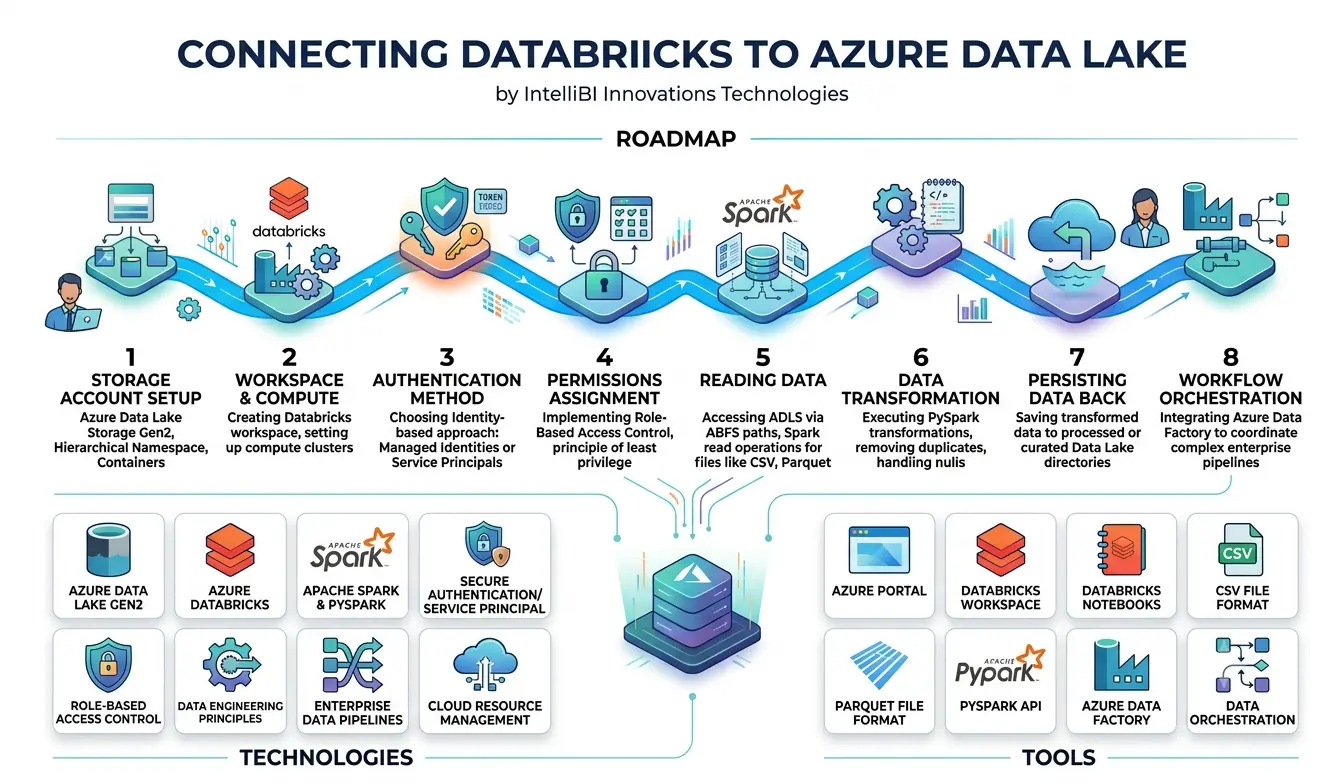
Databricks can connect with Azure Data Lake Storage Gen2 using secure Azure authentication and ABFS storage paths. The basic process includes creating Azure Data Lake Storage, configuring Databricks, setting permissions, authenticating access, connecting through an ABFS path, reading data with Spark or PySpark, transforming it, and writing processed data back to the lake. Azure Data Factory can then be added for pipeline orchestration.
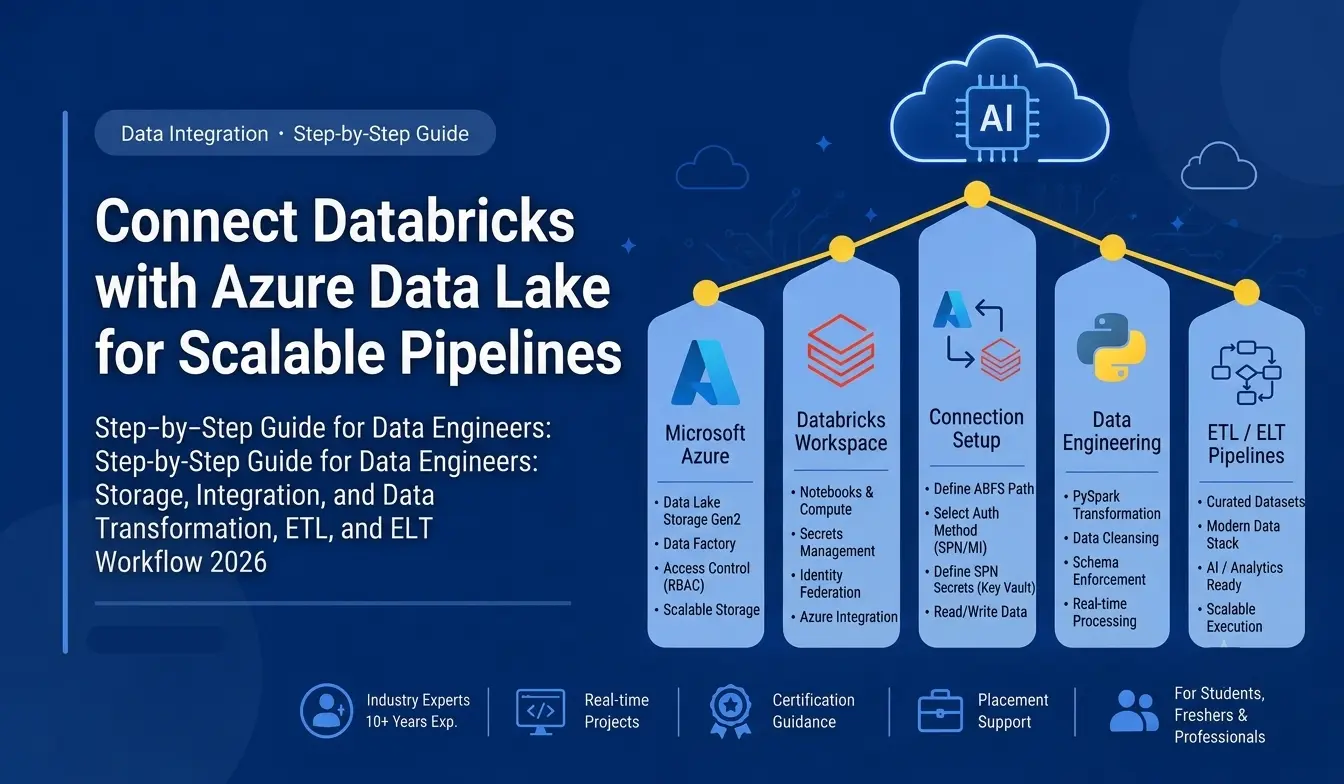
Modern data platforms need more than storage and processing individually. They need a reliable connection between the two. Microsoft Azure provides Azure Data Lake Storage Gen2 for scalable data storage, while Databricks provides a powerful environment for data engineering, analytics, and AI workloads. Connecting these platforms creates a strong foundation for building modern cloud data pipelines.
For professionals planning to work in cloud data engineering, understanding this integration is an important practical skill. This guide explains how Databricks can connect with Azure Data Lake, the authentication options involved, and how the connection can be used for real-world data engineering workflows.
What Is Azure Data Lake Storage Gen2?
Azure Data Lake Storage Gen2 is Microsoft's cloud-based storage solution designed for large-scale analytics workloads. It combines the scalability of Azure Blob Storage with a hierarchical namespace that makes it suitable for organizing files and directories.
Data engineers commonly use Azure Data Lake to store:
- CSV and JSON files
- Parquet datasets
- Application logs
- Transaction data
- IoT data
- Enterprise datasets
- Machine learning data
For learners pursuing an Azure Data Engineer Course in Pune, understanding how storage, processing, transformation, and analytics platforms work together is fundamental.
What Is Databricks?
Databricks is a cloud-based data and AI platform built around Apache Spark. It enables organizations to process large datasets, build data pipelines, perform analytics, and develop machine learning and AI solutions.
Databricks can read data from Azure Data Lake, transform it using Spark or PySpark, and write processed data back into the lake.
A typical architecture looks like this:
Azure Data Lake → Databricks → Data Transformation → Curated Data → Analytics / AI
This integration is a core concept covered in many Databricks Training in Pune and Azure-focused data engineering programs.
Why Connect Databricks with Azure Data Lake?
Connecting Databricks with Azure Data Lake provides a scalable environment for modern data engineering.
Some common advantages include:
- Centralized cloud data storage
- Scalable data processing
- Secure access management
- Support for structured and unstructured data
- Integration with Azure services
- Large-scale ETL and ELT processing
- Support for analytics and machine learning
- Easier development of reusable data pipelines
For professionals taking a Databricks Data Engineering Course in Pune, this integration also provides an opportunity to understand how enterprise data platforms operate beyond individual tools.
Prerequisites Before Connecting Databricks to Azure Data Lake
Before creating the connection, make sure you have:
- An Azure subscription
- An Azure Data Lake Storage Gen2 account
- A Databricks workspace
- Appropriate Azure permissions
- A storage container or filesystem
- Authentication credentials or an identity-based access method
- Basic knowledge of Spark and PySpark
Learners enrolled in Azure Databricks Training in Pune should also understand Azure resource management and access control because authentication is an important part of cloud data engineering.
Step 1: Create an Azure Data Lake Storage Account
Start by creating an Azure Storage Account in the Azure portal.
When configuring the account, enable the hierarchical namespace option. This enables Data Lake Storage Gen2 capabilities.
After creating the storage account, create a filesystem or container for your data.
For example:
raw-data
processed-data
curated-data
This structure can help organize data according to different stages of a data pipeline.
A professional pursuing Azure Data Engineering Course in Pune should understand why separating raw, processed, and curated data is useful for maintainability and governance.
Step 2: Create or Configure the Databricks Workspace
Next, create an Azure Databricks workspace or use an existing workspace.
Inside the workspace, create a compute resource according to your workload requirements.
Databricks provides notebooks where you can write SQL, Python, Scala, and other supported code for data processing.
For learners taking a Databricks Course in Pune, notebooks provide an excellent environment for practising data ingestion, transformation, and validation.
Step 3: Choose an Authentication Method
Security is one of the most important parts of connecting Databricks to Azure Data Lake.
Organizations can use identity-based approaches such as managed identities or service principals, depending on their architecture and security requirements.
The authentication method determines how Databricks proves its identity when accessing the storage account.
In production environments, avoid placing sensitive credentials directly inside notebooks.
Instead, organizations should follow secure identity and secret-management practices.
This is an important concept in both Azure Training in Pune and Databricks Data Engineer Training in Pune because real enterprise environments require controlled access.
Step 4: Assign Storage Permissions
After configuring the identity, assign the appropriate permissions on the Azure Data Lake storage resources.
Access should follow the principle of least privilege.
For example, if a workload only needs to read data, it should not automatically receive write or administrative permissions.
This helps protect enterprise data and reduces unnecessary access.
Understanding Azure role-based access control is therefore an important skill for anyone pursuing a Microsoft Azure Data Engineering Course.
Step 5: Access Azure Data Lake from Databricks
Once authentication and permissions are configured, Databricks can access the Data Lake using supported Azure storage paths.
A common approach is to use an ABFS path.
Example:
abfss://@.dfs.core.windows.net/
This path identifies the filesystem, storage account, and directory containing the data.
From a Databricks notebook, Spark can then be used to read data from the lake.
For example:
df = spark.read.format("parquet").load(
"abfss://container@storageaccount.dfs.core.windows.net/data/"
)
display(df)
The exact authentication configuration should be implemented according to the organization's Azure security architecture.
Step 6: Read Data from Azure Data Lake
Once the connection works, you can load files into a Spark DataFrame.
For CSV data:
df = spark.read.option("header", "true").csv(
"abfss://container@storageaccount.dfs.core.windows.net/raw/"
)
For Parquet:
df = spark.read.parquet(
"abfss://container@storageaccount.dfs.core.windows.net/raw/"
)
Parquet is frequently used in modern data platforms because it is column-oriented and works efficiently with analytical workloads.
This practical experience is valuable for students taking a Databricks PySpark Course in Pune.
Step 7: Transform the Data Using Databricks
After reading the data, Databricks can perform transformations using Spark or PySpark.
For example, you might:
- Remove duplicate records
- Handle missing values
- Standardize column names
- Convert data types
- Join datasets
- Apply business rules
- Aggregate transactional information
- Create analytical datasets
A simple PySpark transformation could look like:
clean_df = df.dropDuplicates().filter(
df["customer_id"].isNotNull()
)
The transformed dataset can then be written back to Azure Data Lake.
Step 8: Write Processed Data Back to Azure Data Lake
After transformation, save the processed data into another Data Lake directory.
For example:
clean_df.write.mode("overwrite").parquet(
"abfss://container@storageaccount.dfs.core.windows.net/processed/"
)
This creates a basic data pipeline:
Source Data → Azure Data Lake → Databricks → Transformation → Processed Data Lake
This architecture can later be expanded with orchestration, monitoring, data quality checks, and analytics services.
Step 9: Integrate Azure Data Factory
For more advanced enterprise pipelines, Azure Data Factory can be used to orchestrate data movement and workflows.
Azure Data Factory can help coordinate processes such as:
Data Source → Data Factory → Azure Data Lake → Databricks → Curated Data
This is why Azure Data Factory Training in Pune is often valuable for aspiring data engineers.
Understanding both Data Factory and Databricks helps professionals work with complete Azure data pipelines rather than isolated tools.
Databricks and Azure Data Lake for ETL
One of the most common use cases is ETL and ELT processing.
For example, an organization may receive daily sales data from multiple sources.
The workflow could be:
- Ingest source data.
- Store raw data in Azure Data Lake.
- Trigger a Databricks job.
- Transform the data using PySpark.
- Validate the results.
- Store curated datasets.
- Connect the data to Power BI or another analytics platform.
This type of workflow is an important practical topic in Azure ETL Training in Pune and Databricks Training in Pune.
Common Problems When Connecting Databricks to Azure Data Lake
Beginners may encounter several issues during setup.
Authentication errors
Incorrect credentials, identities, or authentication configurations can prevent access.
Permission errors
The identity may be valid but lack the required Azure storage permissions.
Incorrect storage path
A typo in the ABFS path can cause file-not-found or access errors.
Network configuration
Enterprise environments may use networking restrictions that affect connectivity.
Incorrect filesystem structure
Incorrect container or directory names can also cause read and write failures.
Troubleshooting these problems is an important part of practical cloud training.
Security Best Practices
When working with Azure Data Lake and Databricks, security should be considered from the beginning.
Follow practices such as:
- Use identity-based authentication where appropriate.
- Avoid exposing secrets in notebooks.
- Apply least-privilege access.
- Separate development and production environments.
- Monitor access and activity.
- Protect sensitive datasets.
- Use appropriate Azure governance controls.
These practices are essential for professionals pursuing an Azure Certification Course in Pune or enterprise-level data engineering careers.
Career Benefits of Learning Azure and Databricks
Azure and Databricks skills are useful for professionals targeting modern data roles.
Potential career paths include:
- Azure Data Engineer
- Data Engineer
- Databricks Data Engineer
- Cloud Data Engineer
- Big Data Engineer
- Analytics Engineer
- Data Platform Engineer
A combination of Azure, Databricks, SQL, Python, Spark, and data pipeline knowledge can help professionals build a stronger technical portfolio.
For learners comparing a Databricks Course with Placement in Pune or an Azure-focused program, practical project exposure should be an important consideration.
Why Practical Training Matters
Watching tutorials can explain how a technology works, but building a complete pipeline develops a deeper understanding.
A strong project might include:
- Azure Data Lake
- Azure Data Factory
- Databricks
- PySpark
- Delta Lake
- SQL
- Data quality checks
- Pipeline monitoring
- BI reporting
This type of project can demonstrate how multiple technologies work together.
At IntelliBI Innovations Technologies, practical, project-oriented learning can help learners connect individual technologies to real-world business scenarios.
Choosing Azure and Databricks Training in Pune
When evaluating an Azure or Databricks program, look beyond the course title.
Check whether the curriculum includes:
- Hands-on cloud labs
- Azure Data Lake
- Azure Data Factory
- Databricks
- Apache Spark
- PySpark
- ETL pipelines
- Real-world datasets
- Capstone projects
- Interview preparation
- Career guidance
Learners searching for the Best Databricks Institute in Pune or the Best Azure Data Engineering Course in Pune should evaluate the actual practical experience included in the program rather than relying only on certification claims.
Frequently Asked Questions
Can Databricks connect directly to Azure Data Lake?
Yes. Azure Databricks can access Azure Data Lake Storage Gen2 using supported Azure storage protocols and authentication mechanisms. The exact configuration depends on the security architecture and access method being used.
Is Azure Data Lake required for Databricks?
No. Databricks supports multiple storage and data sources. However, Azure Data Lake Storage Gen2 is a common choice for Azure-based enterprise data platforms.
Do I need Python to learn Databricks?
Python is highly useful because PySpark is widely used for data transformation and engineering workloads in Databricks. SQL and Spark fundamentals are also valuable.
Is Databricks useful for Azure Data Engineers?
Yes. Databricks is commonly used for large-scale data processing, transformation, analytics, and AI workloads. Understanding how it integrates with Azure storage and orchestration services can strengthen a data engineering skill set.
Can working professionals learn Azure and Databricks?
Yes. Working professionals can learn these technologies through structured training and hands-on projects. Flexible learning schedules can make it easier to balance professional responsibilities with technical upskilling.
Conclusion
Connecting Databricks with Azure Data Lake is a fundamental skill for modern cloud data engineering. The integration allows organizations to store large volumes of data in Azure Data Lake and use Databricks for scalable processing, transformation, analytics, and AI workloads.
The complete workflow can extend from Azure Data Factory and Data Lake to Databricks, PySpark, curated datasets, and business intelligence platforms.
For professionals planning a career in data engineering, learning individual tools is only the beginning. The real advantage comes from understanding how those tools work together to solve business problems.
If you are exploring an Azure Data Engineer Course in Pune, Databricks Data Engineering Course in Pune, or Microsoft Azure Data Engineering Course, prioritize practical projects that allow you to build complete cloud data pipelines.
IntelliBI Innovations Technologies focuses on practical, industry-oriented technology learning designed to help learners build skills that can be applied beyond the classroom.